All TutorialsExisting Accounts
How to Change Your XM IB on an Existing Account
Already have an XM account but are not receiving cashback? You do not need to close it. Open a new trading account under our IB instead.
Note: XM does not allow the IB on an existing trading account to be changed. The solution is to open a new MT4 or MT5 account from your Members Area.
1
Log in to your XM Members Area.
2
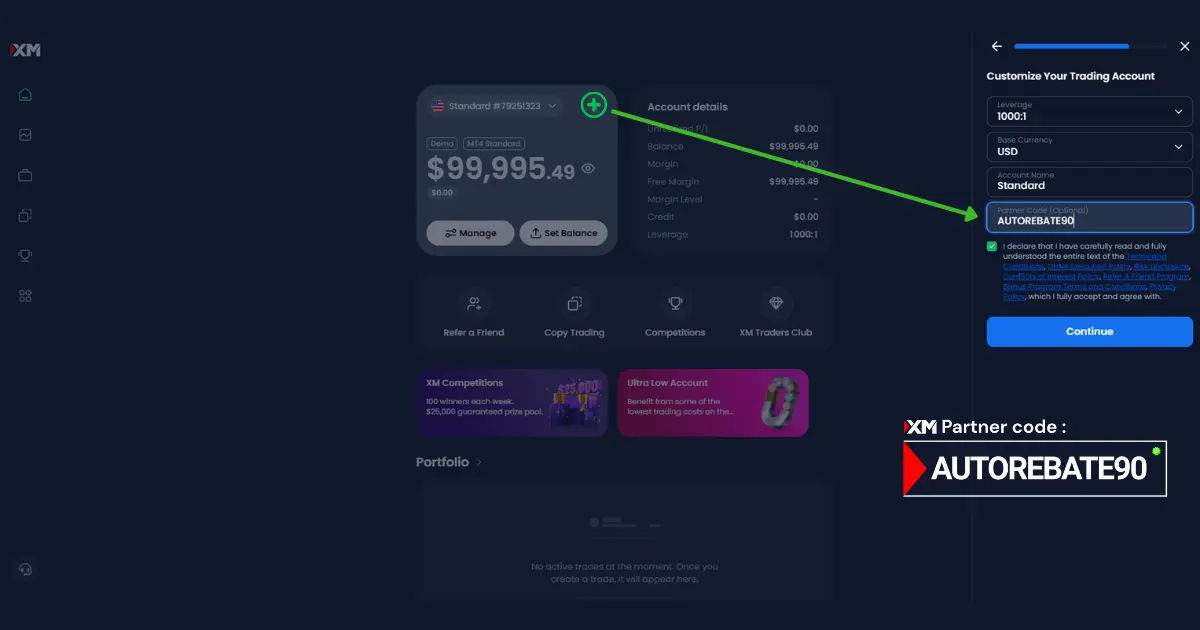
Click the + icon in the Accounts section. A panel will appear on the right—continue from there.
3
Choose your preferred platform (MT4 or MT5) and account currency.
4
In the Introducer Code or IB Code field, enter AUTOREBATE90.
5
Done. Your new account is now connected to the 90% Auto-Cashback system.
Need more help?
Check your rebate status anytime or contact our team if you need assistance.